Creating Bots
This section will show you how to create your first bot.
On Crodl, after you have connected an exchange via API keys, you can click on Bots in the navbar.
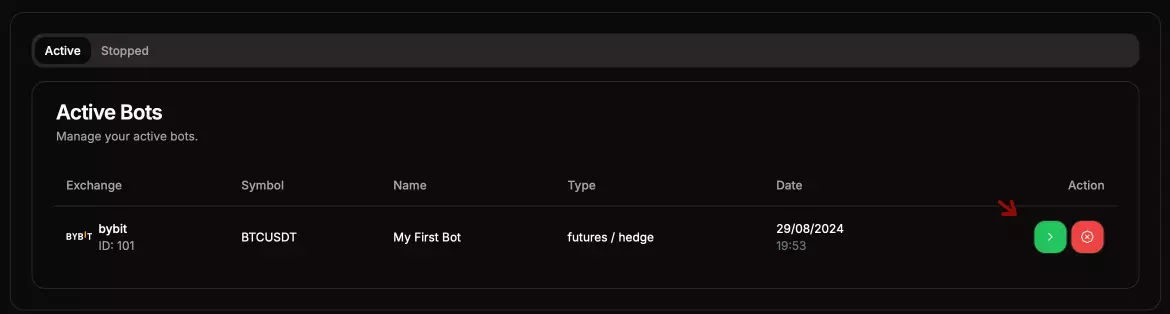
- You should see this page:

- Here, you can manage your active and stopped bots by stopping or deleting them. Keep in mind that stopped bots' triggers won't be executed, and if you delete a bot, it can't be undone.
Create Bot
- Select Create Bot. This should bring up a popup:

There are two Trading Type options for bots: SPOT and FUTURES/LEVERAGE trading. Here, you will specify the type of bot you want to create.
Bot Options
- Bot Name: You can name your bot anything.
- Exchange: This will show a list of exchanges you have connected. If it's empty, you need to connect an exchange first.
- Key Name: Crodl allows you to connect more than one key for the same exchange, for example, a sub-account or additional profiles. This means you can select the key for this bot.
- Trading Types: This allows you to choose between SPOT and FUTURES. Keep in mind that if the exchange only supports one type, that will be the only option in the list.
- Hedge / One-Way Mode: This option is available for Futures only. It's very important that you match this option with the exchange symbol; the bot won't work if the types do not match what you have on the exchange.
- Symbol: This is the symbol that you want to trade. For example, "BTCUSDT" is valid; "BTC" or "btcusdt" is not valid.
Remember:
The trading mode needs to be set on the exchange and must match the option you select on the bot.
Here is an example of what a valid futures bot should look like:

- Now, select the Green Button to activate the bot:
Creating Triggers
Creating Triggers: Now that your bot has been successfully created, you can proceed with creating triggers for your bot.