Blofin Position Mode for Futures
How to change position mode.
Visit the Blofin Website Futures Page
Go to https://blofin.com/futures/BTC-USDT. Ensure you are logged in and viewing a futures symbol, as each symbol has its own settings.
Step 1 - Navigate to the Settings Icon in the Top Right
In the top-right corner, you will see a settings icon. Clicking it will display all the settings you can change for this symbol, including the position mode.
- Select Settings.

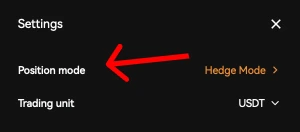
Step 2 - Set the Position Mode
- Set Your Desired Position Mode.
Important:
Your position mode on the bot should match the exchange's position mode.
- Set the Position Mode on the Bot.
During the bot creation step, ensure your position mode matches the exchange's mode.
